
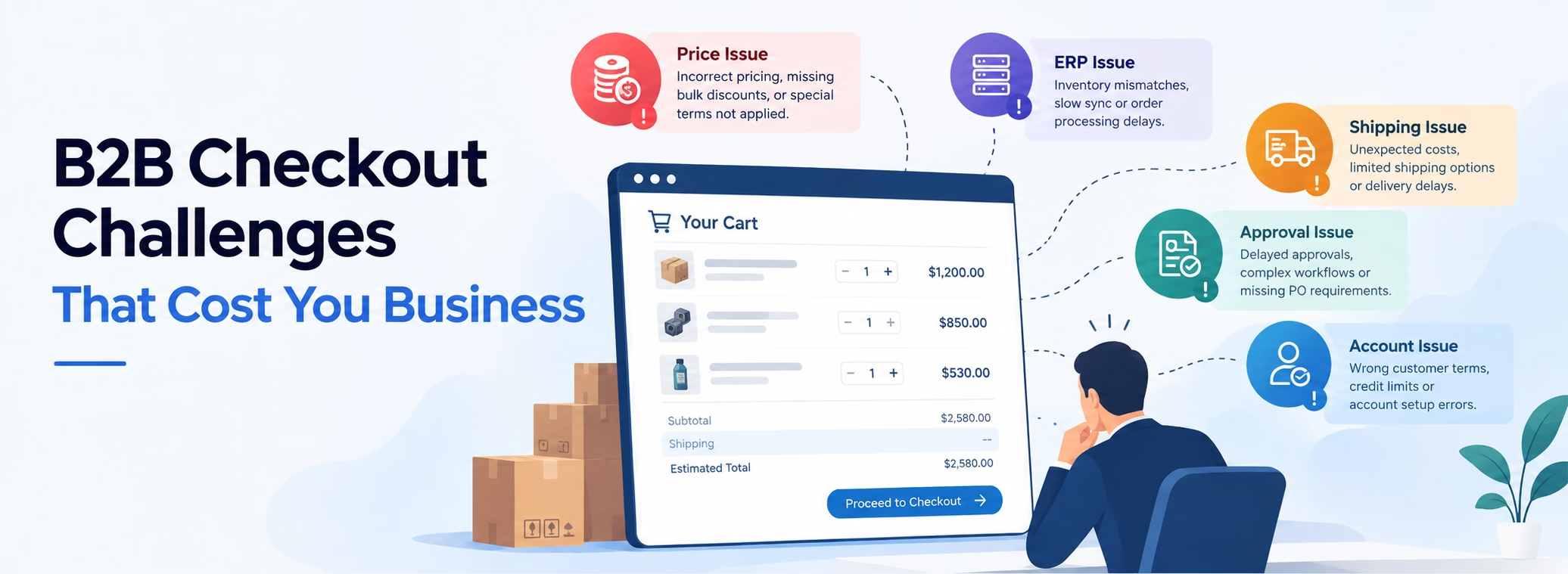
B2B checkout challenges often become visible at the moment a wholesale customer is ready to place an order. A wholesale customer logs into your Magento or Adobe Commerce store, finds the products they regularly purchase and adds them to the cart. Everything looks normal until checkout. The price is different from the negotiated price they normally receive, and the customer contacts your team to find out why.
Before that issue is resolved, another customer reports that the payment method their company normally uses is unavailable. A third customer cannot move a purchase order through the approval process, while another reports that checkout is taking unusually long to complete. The problems appear unrelated, but they have one thing in common: customers are reaching checkout but cannot complete their orders as expected.
For the eCommerce team, this is where troubleshooting can become complicated. The first assumption is often that something is wrong with the checkout itself. That may be true, but it is not always the case. In a B2B store, the final checkout experience can depend on how customer accounts, pricing, purchasing rules and connected systems work together. A problem that appears on the checkout page may have started somewhere earlier in the order journey.
That distinction is important because changing the checkout does not necessarily fix the underlying issue. Before making another customization or adding another extension, the technical team needs to understand what is actually preventing the order from being completed.
Table of Contents
- 1. The Price Looks Right on the Product Page, Then Changes in the Cart
- 2. Purchase Orders and Approval Workflows Get Stuck
- 3. ERP and eCommerce Data Do Not Always Match
- 4. Customizations and Extensions Can Create Checkout Conflicts
- 5. Bulk Ordering and Reordering Do Not Work as Expected
- 6. Shipping, Tax and Payment Rules Do Not Work for Every Customer
- 7. Checkout Becomes Slow When Customers Place Complex Orders
- How Do You Know If Your B2B Store Has a Checkout Problem?
- What To Do If You Recognize These Problems
- How Navigate Commerce Can Help
- Conclusion
- FAQs
So, where do B2B checkout problems really come from, and how can you identify the cause before they cost you more orders?
This article looks at seven common B2B checkout challenges that can affect Magento and Adobe Commerce stores, from pricing and approval problems to integration, payment and checkout performance issues.
1. The Price Looks Right on the Product Page, Then Changes in the Cart
A common B2B checkout challenge occurs when a customer sees the negotiated price they expect on the product page, but the amount changes after the product is added to the cart. The product may be correctly configured, and the customer may be logged into the right company account, yet the cart shows a different price.
In Adobe Commerce B2B, pricing can depend on the customer's company, shared catalog and customer-specific pricing. Custom pricing rules or integrations with ERP and other business systems can add further complexity
For the customer, the discrepancy creates uncertainty at the point of purchase. For the merchant, it can lead to support requests, manual order handling and lost confidence in the online ordering process. The visible pricing issue may therefore be a sign of a deeper configuration, customization or integration problem.
2. Purchase Orders and Approval Workflows Get Stuck
Many B2B buyers do not complete an order through an immediate card payment. Their company may use purchase orders, spending limits or internal approval processes before an order can be submitted. When these workflows do not behave as expected, the customer may be able to build the entire order but cannot move it through the final approval stage.
The problem can appear in different ways. An approval option may not be available to the right user, an order may remain pending, or a buyer may be unable to complete an order that should be within their purchasing authority. These issues can become particularly difficult when different users within the same company have different roles and permissions.
For the merchant, a failed approval workflow can stop an otherwise valid B2B order from being completed. It can also force customers to move the process offline, creating additional work for sales and customer service and reducing the value of the online ordering experience.
3. ERP and eCommerce Data Do Not Always Match
B2B stores often rely on Magento or Adobe Commerce alongside an ERP or other business systems that manage products, inventory, pricing, customers or orders. When the information between these systems is not synchronized correctly, customers can encounter problems even though the storefront itself appears to be working normally.
A product may show as available when the actual inventory is different, customer information may not reflect the latest account data, or an order may fail because required information was not transferred correctly between systems. These issues can be difficult to spot because the problem may only appear for certain products, customers or order types.
For the customer, the result can be an incorrect product or order experience. For the merchant, inconsistent data can lead to failed orders, manual processing and additional work across eCommerce, sales and operations teams. The checkout may expose the problem, but the underlying issue can originate in the data or integration layer behind the store.
4. Customizations and Extensions Can Create Checkout Conflicts
B2B stores often need custom functionality to support specific pricing, ordering, payment or account requirements. Over time, these customizations can become closely connected with third-party extensions and other parts of the Magento or Adobe Commerce implementation.
A change to one part of the checkout can therefore affect another. An extension update may introduce unexpected behavior, custom code may conflict with existing functionality, or several modules may interact differently after a platform upgrade. The problem may only appear for certain customers, products or order conditions, making it difficult to reproduce during a standard checkout test.
For the merchant, these conflicts can result in failed orders, inconsistent checkout behavior or recurring issues that become harder to manage as more customizations are added. What appears to be a simple checkout error may actually reflect the way multiple custom components work together.
5. Bulk Ordering and Reordering Do Not Work as Expected
B2B customers often place larger, repeat orders rather than buying one product at a time. They may use quick order tools, SKU-based ordering or reorder previous purchases to save time. When these workflows fail, the customer can spend considerably more time rebuilding an order that should have been straightforward.
Problems can include products not being recognized, quantities not behaving as expected, unavailable items appearing in a reorder, or previously purchased products no longer matching the customer's current pricing or catalog rules. These issues may only affect particular SKUs, customer accounts or order combinations, which can make them difficult to identify.
For the merchant, a broken bulk-ordering or reordering experience can turn one of the main advantages of B2B eCommerce, efficient repeat purchasing, into a reason for customers to return to email, phone or manual ordering.
6. Shipping, Tax and Payment Rules Do Not Work for Every Customer
B2B checkout rules can vary significantly between customers, companies and orders. One customer may have specific payment terms, another may require a particular shipping method, while tax treatment can depend on the customer's business details and location. When these rules are not applied as expected, the customer may find that a familiar payment or shipping option is missing or that the order total changes unexpectedly.
These problems can be especially confusing when the same checkout works correctly for one customer but fails for another. The difference may come from company settings, customer permissions, shipping or payment configuration, or the way specific order conditions are handled.
For the merchant, these issues can prevent otherwise valid orders from being completed and create additional support requests. They can also make the checkout experience feel inconsistent, particularly for B2B customers who expect their agreed purchasing terms to be reflected automatically.
7. Checkout Becomes Slow When Customers Place Complex Orders
A checkout that works quickly for a simple order can behave very differently when a B2B customer places a larger or more complex order. More products, quantities, customer-specific rules and connected services can increase the amount of processing required before the order is completed.
For stores using Hyvä Checkout, the checkout remains part of the wider Adobe Commerce implementation, where customizations, integrations and other components can influence how the ordering process behaves.
The customer may experience this as a checkout page that takes too long to respond, a shipping or payment option that keeps loading, or an order submission that appears to stop responding. In some cases, the problem may only occur with particular customers, product combinations or order sizes, making it difficult to identify during basic testing.
For the merchant, slow checkout is more than a performance issue. A customer who is ready to place a large order should not have to wait or wonder whether the order was submitted successfully. When delays become frequent, customers may abandon the online process and return to email, phone or other manual ordering methods, reducing one of the key benefits of having a B2B eCommerce channel.
These B2B checkout challenges do not always appear as obvious checkout errors. Some may first show up through customer complaints, abandoned orders or manual order processing.
How Do You Know If Your B2B Store Has a Checkout Problem?
Not every checkout problem produces an obvious error message. In many B2B stores, the first signs appear in customer behavior or in the way your internal teams handle orders. Customers may start contacting sales or support because they cannot use a payment method they normally rely on, their negotiated price looks incorrect, or an order cannot move through an expected approval step.
Your internal teams may notice other warning signs. Sales representatives may be completing orders manually that customers previously placed through the website. Customer service may receive repeated questions about missing shipping or payment options. The development team may also see checkout errors that occur only for certain companies, products or order combinations.
Order and analytics data can provide another indication. A sudden increase in checkout abandonment, failed transactions or incomplete orders may warrant investigation, particularly if it begins after a platform upgrade, extension change, custom development or integration update. A pattern is often more useful than a single failed order.
You should also pay attention to problems that are difficult to reproduce. If a customer reports an issue but your team cannot reproduce it with a standard test account, that does not necessarily mean the customer's experience is isolated. B2B stores can apply different rules based on the customer, company, catalog, pricing, payment terms and order conditions.
When customer complaints, manual order handling, checkout failures or unusual abandonment start appearing repeatedly, they can be signs that the B2B ordering experience needs a closer technical review.
What To Do If You Recognize These Problems
If you are seeing repeated B2B checkout challenges, the next step is not to immediately change the checkout or add another extension. Start by looking for a pattern. Identify which customers, companies, products or order types are affected and when the problem began. This can help determine whether the issue is isolated or connected to a wider change in the Magento or Adobe Commerce environment.
It is also worth reviewing recent changes to the store, including platform upgrades, extension updates, custom development and integrations. A problem that appears to be related to pricing, payment or checkout performance may have started after a change elsewhere in the commerce setup.
For more complex B2B stores, these problems can involve several connected components, so isolated fixes may not address the underlying cause. The important step is to understand where the order journey is breaking and what is contributing to it before deciding what needs to change.
If the same problems continue across customers or order types, a technical review of the Magento or Adobe Commerce implementation can help establish whether the issue is related to configuration, custom code, extensions, integrations or the wider checkout architecture.
How Navigate Commerce Can Help
When B2B checkout problems keep recurring, the issue is often not limited to a single error on the checkout page. The underlying cause may involve Adobe Commerce configuration, custom development, third-party extensions, integrations, or the way different parts of the store work together.
As an Adobe Commerce Development Company, Navigate Commerce can review the B2B ordering experience to understand where these issues originate and what needs attention. As a Hyvä Gold Partner, our experience across Magento, Adobe Commerce, and Hyvä allows us to look at the wider implementation rather than focusing only on the checkout interface.
This can include customer and company configuration, pricing and catalog behavior, checkout customizations, payment and shipping integrations, ERP connections, and other components that influence the order journey.
The goal is not to apply a quick fix without understanding the cause. Through our Adobe Commerce Support and Maintenance Services, our team can investigate the affected workflow, identify the technical factors contributing to the problem, and recommend the appropriate next steps based on the findings.
If your Magento or Adobe Commerce store is experiencing recurring pricing discrepancies, failed approvals, integration issues, checkout errors, or performance problems, a technical assessment can help you understand what is happening before those issues continue to affect your customers and orders.
Conclusion
B2B checkout problems rarely remain limited to the final checkout screen. A pricing discrepancy, failed approval, missing payment option, data mismatch or slow order submission can be a symptom of a deeper issue within the Magento or Adobe Commerce store.
The first step is to recognize the patterns. If customers are repeatedly facing similar problems, orders are being handled manually, or checkout issues appear after changes to the platform, extensions, custom code or integrations, the underlying setup may need a closer review.
Understanding where the problem originates is important before making changes. A technical assessment can help determine whether the issue is related to configuration, custom development, third-party extensions, integrations or the way different components of the B2B ordering process work together.
FAQs
What are the most common B2B checkout challenges?
Common challenges include incorrect customer-specific pricing, purchase order and approval issues, payment or shipping problems, ERP and eCommerce data mismatches, extension conflicts, bulk-ordering issues and slow checkout performance. The specific problems can vary depending on how the Magento or Adobe Commerce store is configured and integrated.
Why can B2B checkout problems be difficult to identify?
B2B checkout can depend on customer accounts, company rules, pricing, payment terms, customizations and external systems. As a result, an issue that appears during checkout may actually originate earlier in the ordering process or in a connected system.
How can I tell if my B2B checkout has a problem?
Look for recurring customer complaints, incorrect prices, failed or delayed approvals, missing payment or shipping options, failed orders, increasing manual order processing or checkout abandonment. Problems that affect only certain customers, companies or order types can also indicate an issue that needs investigation.
Can a Magento or Adobe Commerce upgrade cause B2B checkout issues?
An upgrade can affect custom code, third-party extensions or integrations that interact with the checkout and B2B functionality. If problems begin after an upgrade, the changes made during that release should be considered as part of the investigation.
Should I replace or customize my checkout if customers are experiencing problems?
Not necessarily. A checkout problem may be caused by configuration, custom development, an extension or an external integration rather than the checkout itself. The underlying cause should be understood before deciding whether a checkout change is appropriate.
How can Navigate Commerce help with B2B checkout problems?
Navigate Commerce can review the Magento or Adobe Commerce implementation and the components involved in the B2B ordering journey. Depending on the issue, this can include B2B configuration, custom development, extensions, checkout functionality and integrations to help identify the areas contributing to the problem.